
 Kanshi Tanaike


Description
In this report, I would like to introduce a sample script for efficiently deleting rows by conditions on Google Spreadsheet using Google Apps Script. Recently, I had a situation for being required to achieve this situation. In my report, it has already known that when Sheets API is used, the rows can be efficiently deleted by a condition. Ref However, in that case, Sheets API couldn’t be used. Under this situation, I came up with a method. In this report, I would like to introduce this method.
First, I would like to show you the sample Spreadsheet as follows.
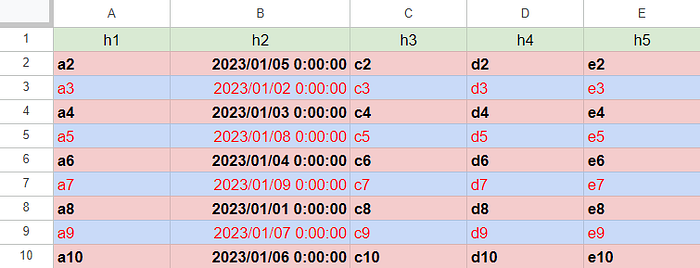
In this sample Spreadsheet, there are 5 columns. And, column “B” has the date object randomly put. Those data values are 2023/01/01 00:00:00 to 2023/01/10 00:00:00 and all values are unique values in this column. Under this condition, it was required to delete all rows before 2023/01/05 (this value is a sample condition for the above Spreadsheet.) with the low process cost and keeping the background colors, the text styles, and the text alignments. The output situation is as follows.
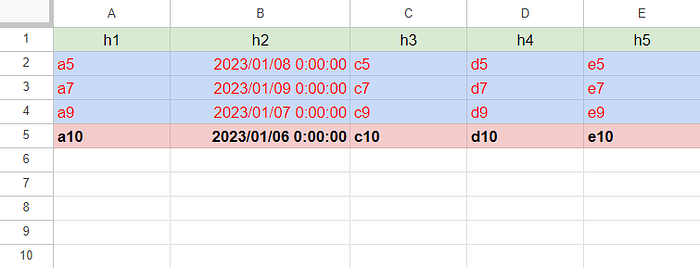
In the actual situation, the number of rows was about 100,000. I thought that the following 3 patterns.
Sample 1
function sample1() { const threshouldDate = new Date("2023-01-05T06:00:00").getTime(); const sheet = SpreadsheetApp.getActiveSpreadsheet().getSheetByName("Sheet1"); const range = sheet.getDataRange(); const [header, ...values] = range.getValues(); const [headerColor, ...valueColors] = range.getBackgrounds(); const [headerStyle, ...valueStyles] = range.getTextStyles(); const [headerVAlign, ...valueVAligns] = range.getVerticalAlignments(); const [headerHAlign, ...valueHAligns] = range.getHorizontalAlignments(); const { v, c, s, av, ah } = values.reduce((o, r, i) => { if (r[1].getTime() >= threshouldDate) { o.v.push(r); o.c.push(valueColors[i]); o.s.push(valueStyles[i]); o.av.push(valueVAligns[i]); o.ah.push(valueHAligns[i]); } return o; }, { v: [header], c: [headerColor], s: [headerStyle], av: [headerVAlign], ah: [headerHAlign] }); range.clear().offset(0, 0, v.length, v[0].length).setValues(v).setBackgrounds(c).setTextStyles(s).setVerticalAlignments(av).setHorizontalAlignments(ah);}
When this script is run to the above sample Spreadsheet, the above-expected result is obtained. When the number of rows is 100,000 and 50,000 rows are required to be deleted from these rows, the average process time was 67 seconds.
Sample 2
function sample2() { const threshouldDate = new Date("2023-01-05T06:00:00").getTime(); const sheet = SpreadsheetApp.getActiveSpreadsheet().getSheetByName("Sheet1"); const range = sheet.getDataRange(); const [, ...values] = range.getValues(); values.reverse().forEach((r, i, a) => { if (r[1].getTime() <= threshouldDate) { sheet.deleteRow(a.length - i + 1); } });}
When this script is run to the above sample Spreadsheet, the above-expected result is obtained. When the number of rows is 100,000 and 50,000 rows are required to be deleted from these rows, an error of “Exceeded maximum execution time” occurs.
Sample 3
function sample3() { const threshouldDate = new Date("2023-01-05T06:00:00").getTime(); const sheet = SpreadsheetApp.getActiveSpreadsheet().getSheetByName("Sheet1"); const range = sheet.getDataRange(); const [header, ...values] = range.getValues(); const dstValues = [header, ...values.map(r => r[1].getTime() > threshouldDate ? r : header)]; range.setValues(dstValues).removeDuplicates(); }
When this script is run to the above sample Spreadsheet, the above-expected result is obtained. When the number of rows is 100,000 and 50,000 rows are required to be deleted from these rows, the average process time was 13 seconds.
Summary
In this report, I introduced the method for efficiently deleting rows by conditions on Google Spreadsheet using Google Apps Script. From this report, I obtained the following result.
https://gist.github.com/tanaikech/5e5f736d1102aaef85761f4ffae3c4b4
As a result, it was found that when the rows are deleted with keeping the background colors, the text styles, and the text alignments, sample pattern 3 using “removeDuplicates” is suitable. But, if this method is used for other situations, I think that it is required to check whether the duplicate rows are existing before the rows are deleted. So, I think that the above script of “Sample 3” should be modified as follows.
const check_ = values => [...values.reduce((m, e) => { const k = e.join(""); return m.set(k, m.has(k) ? true : false);}, new Map()).values()].includes(true);function modified_sample3() { const threshouldDate = new Date("2023-01-05T06:00:00").getTime(); const sheet = SpreadsheetApp.getActiveSpreadsheet().getSheetByName("Sheet1"); const range = sheet.getDataRange(); const [header, ...values] = range.getValues(); if (check_([header, ...values])) { console.log("This method cannot be used.") return; } const dstValues = [header, ...values.map(r => r[1].getTime() > threshouldDate ? r : header)]; range.setValues(dstValues).removeDuplicates(); }